The requested URL was not found on the server
Cause:
- Incorrect API method while calling the API.
- Feature required for the API call is not enabled on your account.
- Check and use the correct API method.
- Contact our Support team to enable the feature on your account.
Sample Error Response
Access Denied
Cause: Whitelisted IPs on your account.Solution: Contact our Support team to verify and confirm if any IPs are currently whitelisted on your account. If yes, remove the whitelisted IPs for both test and live modes.
Sample Error Response
The API key provided is invalid
Cause:
- Incorrect API key or secret used in the request.
- Test mode key used in live mode or vice versa.
- API key has been regenerated and the old key is still in use.
- Verify that you are using the correct API key and secret from the Dashboard.
- Ensure the key corresponds to the correct mode (test or live).
- If you have recently regenerated your API key, update it in your integration.
Sample Error Response
The id provided does not exist or access is unauthorised
Cause:
- The entity ID (such as a payment ID, order ID or refund ID) passed in the request does not exist.
- The entity belongs to a different account than the one making the request.
- A test mode ID is used in live mode or vice versa.
- Check that the ID is correct and belongs to the authenticated account.
- Ensure that the mode (test or live) matches the ID being used.
Sample Error Response
A required parameter is missing
Cause: One or more mandatory parameters were not included in the API request.Solution:
- Review the API request and ensure all required parameters are included.
- Refer to the relevant API endpoint documentation to check which parameters are mandatory.
Sample Error Response
Invalid parameter value
Cause:
- A parameter was passed with an incorrect data type, format or value (for example, a string passed where an integer is expected).
- A field value exceeds the allowed length or range.
- Check the data type and format expected for each parameter in the API documentation.
- Ensure values fall within the allowed range or length limits.
Sample Error Response
Too many requests
Cause: Your integration has exceeded the allowed API request rate limit within a given time window.Solution:
- Implement exponential backoff and retry logic in your integration.
- Reduce the frequency of API calls, particularly for polling-based implementations.
- Use webhooks instead of polling to receive real-time updates on payment and order events.
- To request a limit increase, contact Razorpay Curlec Support. Requests are reviewed case-by-case and approved only for legitimate use cases.
Sample Error Response
Server error
Cause: An unexpected error occurred on the server while processing your request. This may be a transient issue.Solution:
- Retry the request after a short delay.
- Ensure the request body does not contain unsupported characters such as emojis.
- If the issue persists, contact our Support team with the request details.
Sample Error Response
Handy TipsIf you are using our SDKs for integration, the error responses result in exceptions that need to be handled in your integration.
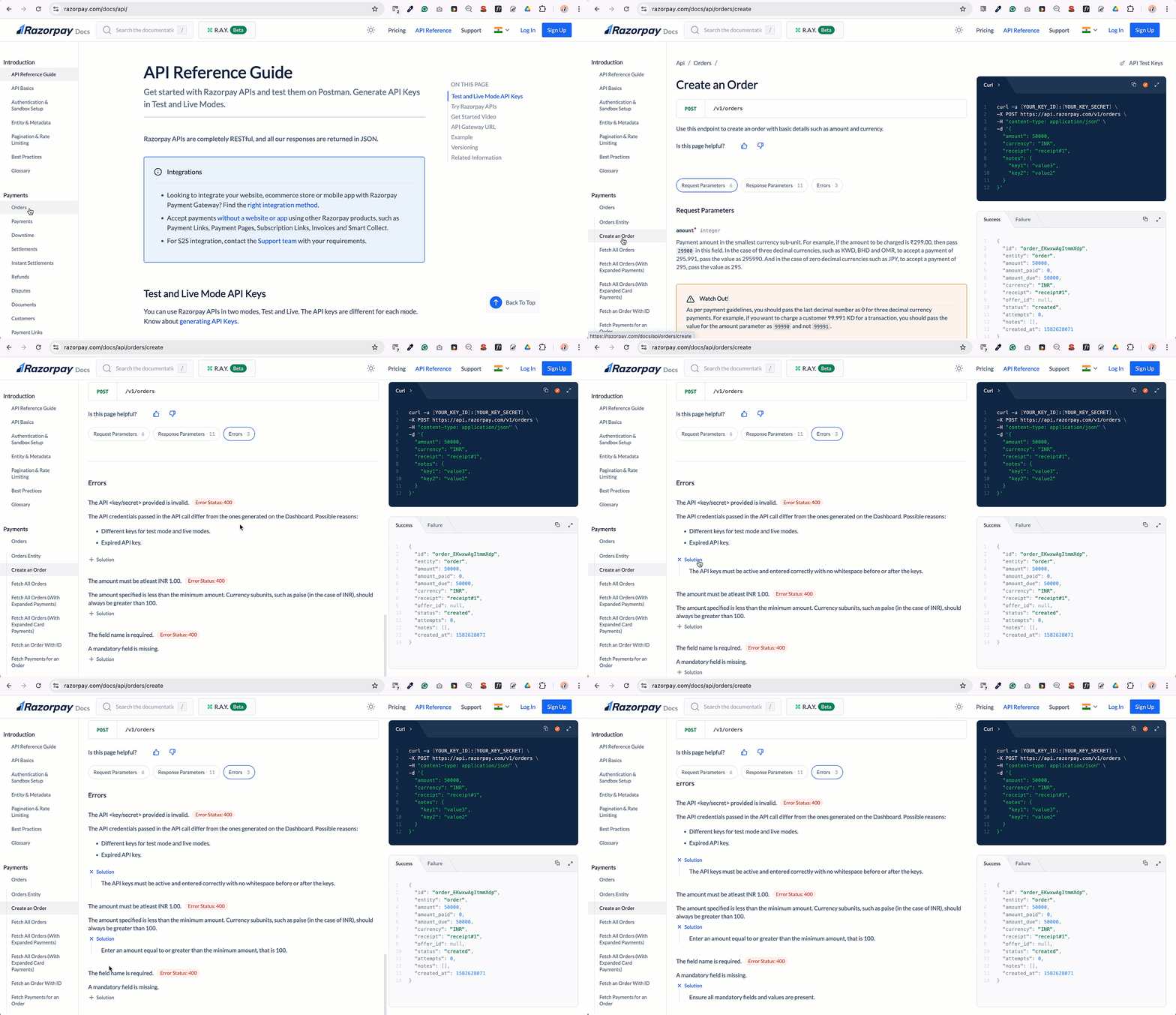
Endpoint-Specific Errors
Each API endpoint page also lists errors specific to that operation — for example, errors you can only hit when creating an order, or when capturing a payment. To view them:- Go to the relevant API endpoint page, such as Create an Order.
- Click the Errors capsule. The list of errors is displayed.