List of values for Source and Step parameters for each payment method supported by Razorpay Curlec.
Available in🇮🇳 India🇲🇾 Malaysia🇸🇬 Singapore🇺🇸 United States
There are certain error codes specific for each payment method supported by Razorpay Curlec. To understand the errors and their reasons, it is recommended to know the source (stakeholders) and the steps involved in the payment flows:
The possible values for the source parameter for cards are listed below:
customer
business
internal
gateway
issuer_bank
The possible values for the step parameter, along with the description, are listed below:
payment_initiation
Your system initiates and sends the payment request to our server. Our server validates your request, creates the payment flow and forwards the request to the Gateway.
card_enrollment_check
Upon receiving a request from Razorpay Curlec, Gateway sends the enrollment check request to the bank for the enrollment of the card check.
payment_authentication
The bank verifies the enrollment of the card, and then requests the authentication of the customer by sending 3DS URL and OTP to the customer.
3DS URL
Bank sends the Authentication (3DS URL), which is routed through Gateway > Razorpay Curlec > Customer.
OTP
The bank sends the OTP to the customer’s mobile directly. The customer enters the valid OTP within the time on the bank’s OTP page.
payment_authorization
Once the customer has completed the authentication, the bank authorises the release of the funds. The authorisation status is communicated to the Gateway which in turn communicates the same to Razorpay Curlec.
payment_capture
Once the payment is successfully authorised, Razorpay Curlec sends the capture request to the Gateway which in turn sends the same to the bank to capture the authorised payment.
The possible values for the source parameter for FPX are listed below:
customer
business
internal
issuer_bank
The possible values for the step parameter, along with the description, are listed below:
payment_initiation
Your system initiates and sends the payment request to our server. Razorpay Curlec sends the bank URL back to you.
payment_authentication
The customer logs into his bank account and completes the transaction.
payment_authorization
Upon successful authentication, bank authorises the release of funds and notifies Razorpay Curlec. Razorpay Curlec in turn, notifies the business.
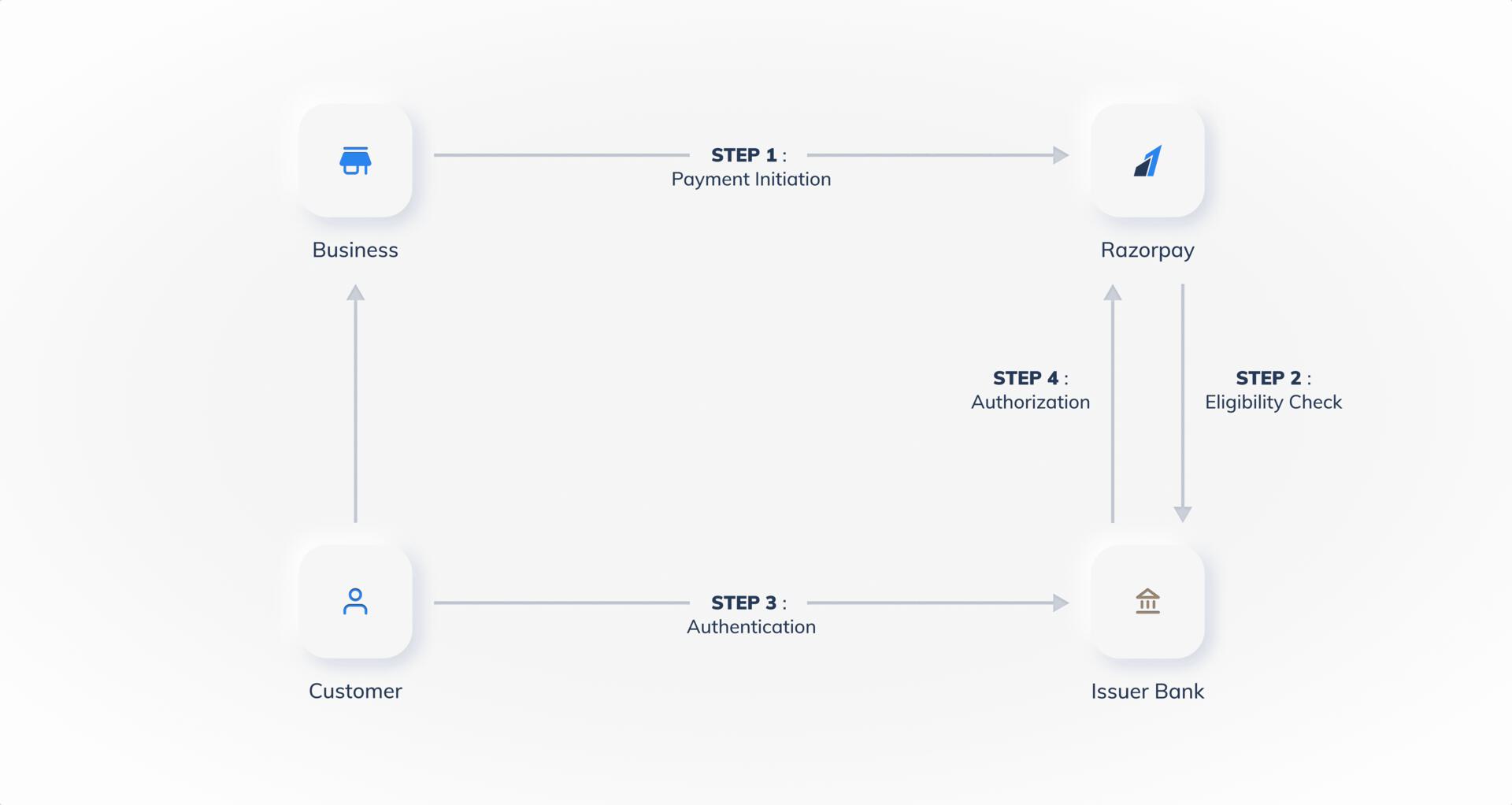
The payment flow for Wallet payments is illustrated below:
Source Parameter
Step Parameter
The possible values for the source parameter for wallet are listed below:
customer
business
internal
issuer
The possible values for the step parameter, along with the description, are listed below:
payment_initiation
Your system initiates and sends the payment request to our server. Our server sends the same request to the Bank/Gateway.
payment_eligibility_check
Razorpay Curlec sends the eligibility check request to the issuer to determine if the entered customer information is correct.
payment_authentication
Customer authenticates the payment using OTP provided by the issuer.
payment_authorization
Issuer authorises the release of funds and sends confirmation to Razorpay Curlec.
{"docsConfig":{"theme":"mint","$schema":"https://mintlify.com/docs.json","name":"Razorpay","colors":{"primary":"#3395FF","light":"#66B2FF","dark":"#0B62C4"},"logo":{"light":"https://mintcdn.com/doc-test-my/ZVMbrxgGis8rvt2g/logo/light.svg?fit=max\u0026auto=format\u0026n=ZVMbrxgGis8rvt2g\u0026q=85\u0026s=6aab4f40abeef4b048527ba9f05deda3","dark":"https://mintcdn.com/doc-test-my/ZVMbrxgGis8rvt2g/logo/dark.svg?fit=max\u0026auto=format\u0026n=ZVMbrxgGis8rvt2g\u0026q=85\u0026s=46ee6143cb631297999f217bc077aded","href":"/home"},"favicon":"https://mintcdn.com/doc-test-my/ocuE3cGe6n9R22co/favicon.png?fit=max\u0026auto=format\u0026n=ocuE3cGe6n9R22co\u0026q=85\u0026s=923547044b089abf7dc4fc129ef43e00","api":{"playground":{"display":"interactive"},"mdx":{"auth":{"method":"basic"},"server":"https://api.razorpay.com"}},"navbar":{"links":[{"href":"https://curlec.com/support","label":"Support"},{"href":"https://curlec.com/blog","label":"Blog"}],"primary":{"type":"button","label":"Dashboard","href":"https://dashboard.curlec.com/"}},"footer":{"socials":{"x":"https://x.com/Razorpay","linkedin":"https://www.linkedin.com/company/razorpay","github":"https://github.com/razorpay","youtube":"https://www.youtube.com/razorpay"},"links":[{"header":"Products","items":[{"label":"Payment Gateway","href":"https://curlec.com/payment-gateway"},{"label":"Payment Links","href":"https://curlec.com/payment-links"}]},{"header":"Resources","items":[{"label":"Documentation","href":"https://curlec.com/docs"},{"label":"API Reference","href":"https://curlec.com/docs/api"},{"label":"Support","href":"https://curlec.com/support"},{"label":"Blog","href":"https://curlec.com/blog"}]},{"header":"Company","items":[{"label":"About Us","href":"https://curlec.com/about"},{"label":"Careers","href":"https://curlec.com/careers"},{"label":"Pricing","href":"https://curlec.com/pricing"}]}]},"contextual":{"options":["copy","view","chatgpt","claude","perplexity","mcp","cursor","vscode"],"display":"header"},"styling":{"latex":false},"navigation":{"pages":[]}},"deployment":{"deploymentMetadataValue":{"subdomain":"doc-test-my","hasAudioNarration":false,"actualSubdomain":"doc-test-my","customDomains":["curlec.com"],"gitSource":{"type":"github","owner":"razorpay-vendor-integrations","repo":"docs-my","deployBranch":"main","contentDirectory":"","isPrivate":true,"mountPath":"","label":""},"chroma":{"latestBuiltDeploymentHistoryId":"6ae2dab6a4272234a4ace2b5","collectionId":"121dde82-7137-4809-b68d-eb4b6e41b2b9","liveDeploymentHistoryId":"6ae2dab6a4272234a4ace2b5","schemaVersion":"v3"},"entitlements":{"AI_CHAT":{"status":"ENABLED"},"REMOVE_BRANDING":{"status":"ENABLED"},"CONTEXTUAL_FEEDBACK":{"status":"ENABLED"},"CODE_SNIPPET_FEEDBACK":{"status":"ENABLED"},"WEB_MCP":{"status":"ENABLED"},"NARRATION":{"status":"ENABLED"}},"buildId":"6ae6e6f262ef36be886356dc","clientVersion":"0.0.4044","searchFilterCounts":[{"language":"default","tag":"Payments","count":428},{"language":"default","tag":"API Reference","count":113},{"language":"default","tag":"Payment Gateway","count":97},{"language":"default","tag":"Dashboard","count":73},{"language":"default","tag":"Route","count":44},{"language":"default","tag":"Subscriptions","count":44},{"language":"default","tag":"Ecommerce Plugins","count":41},{"language":"default","tag":"Invoices","count":34},{"language":"default","tag":"Payment Links","count":34},{"language":"default","tag":"Developer Tools","count":24}]},"assistantConfig":{"enableAskAiButton":false,"enableStarterQuestions":false,"enableContextualStarterQuestions":false,"enableAskAiSearchBar":true},"basePath":"/docs","hasChatPermissions":true,"hasWebMcpPermissions":true,"toggles":[{"name":"kill-isr","enabled":true,"variant":{"name":"disabled","enabled":false,"feature_enabled":true},"impressionData":false},{"name":"agent-mintlify-slack","enabled":true,"variant":{"name":"disabled","enabled":false,"feature_enabled":true},"impressionData":false},{"name":"agent-integrations-settings","enabled":true,"variant":{"name":"disabled","enabled":false,"feature_enabled":true},"impressionData":false},{"name":"automations-pr-grouping","enabled":true,"variant":{"name":"disabled","enabled":false,"feature_enabled":true},"impressionData":false},{"name":"custom-prefix","enabled":true,"variant":{"name":"disabled","enabled":false,"feature_enabled":true},"impressionData":false},{"name":"analytics-v7","enabled":true,"variant":{"name":"disabled","enabled":false,"feature_enabled":true},"impressionData":false},{"name":"user-flows-analytics","enabled":true,"variant":{"name":"disabled","enabled":false,"feature_enabled":true},"impressionData":false},{"name":"no-publish-flow","enabled":true,"variant":{"name":"disabled","enabled":false,"feature_enabled":true},"impressionData":false},{"name":"workos-onboarding","enabled":true,"variant":{"name":"disabled","enabled":false,"feature_enabled":true},"impressionData":false},{"name":"llms-txt-v2","enabled":true,"variant":{"name":"disabled","enabled":false,"feature_enabled":true},"impressionData":false},{"name":"snapshot-serving-live","enabled":true,"variant":{"name":"disabled","enabled":false,"feature_enabled":true},"impressionData":false},{"name":"stripTemperatureMiddleware","enabled":true,"variant":{"name":"disabled","enabled":false,"feature_enabled":true},"impressionData":false},{"name":"support-platform-pylon-zendesk","enabled":true,"variant":{"name":"disabled","enabled":false,"feature_enabled":true},"impressionData":false},{"name":"snapshot-serving","enabled":true,"variant":{"name":"disabled","enabled":false,"feature_enabled":true},"impressionData":false},{"name":"instant-rollback","enabled":true,"variant":{"name":"disabled","enabled":false,"feature_enabled":true},"impressionData":false},{"name":"granular-notifications-server","enabled":true,"variant":{"name":"disabled","enabled":false,"feature_enabled":true},"impressionData":false},{"name":"granular-notifications","enabled":true,"variant":{"name":"disabled","enabled":false,"feature_enabled":true},"impressionData":false},{"name":"automations-fable","enabled":true,"variant":{"name":"disabled","enabled":false,"feature_enabled":true},"impressionData":false},{"name":"fixed-ai-action-pricing","enabled":true,"variant":{"name":"disabled","enabled":false,"feature_enabled":true},"impressionData":false},{"name":"automation-resolve-merge-conflict","enabled":true,"variant":{"name":"disabled","enabled":false,"feature_enabled":true},"impressionData":false},{"name":"scoped-publishing","enabled":true,"variant":{"name":"disabled","enabled":false,"feature_enabled":true},"impressionData":false},{"name":"mintql","enabled":true,"variant":{"name":"disabled","enabled":false,"feature_enabled":true},"impressionData":false},{"name":"page-level-analytics","enabled":true,"variant":{"name":"disabled","enabled":false,"feature_enabled":true},"impressionData":false},{"name":"editor-version-history-v2","enabled":true,"variant":{"name":"disabled","enabled":false,"feature_enabled":true},"impressionData":false},{"name":"billing-page-v2","enabled":true,"variant":{"name":"disabled","enabled":false,"feature_enabled":true},"impressionData":false},{"name":"full-page-search","enabled":true,"variant":{"name":"disabled","enabled":false,"feature_enabled":true},"impressionData":false},{"name":"workspace-projects","enabled":true,"variant":{"name":"disabled","enabled":false,"feature_enabled":true},"impressionData":false},{"name":"assistant-v5","enabled":true,"variant":{"name":"disabled","enabled":false,"feature_enabled":true},"impressionData":false},{"name":"byok-sep-25","enabled":true,"variant":{"name":"disabled","enabled":false,"feature_enabled":true},"impressionData":false},{"name":"fork-pr-previews","enabled":true,"variant":{"name":"disabled","enabled":false,"feature_enabled":true},"impressionData":false},{"name":"revalidation-jwt","enabled":true,"variant":{"name":"disabled","enabled":false,"feature_enabled":true},"impressionData":false},{"name":"vite-origin","enabled":true,"variant":{"name":"disabled","enabled":false,"feature_enabled":true},"impressionData":false},{"name":"billing-updated-9-15","enabled":true,"variant":{"name":"disabled","enabled":false,"feature_enabled":true},"impressionData":false},{"name":"workos-sso-scim","enabled":true,"variant":{"name":"disabled","enabled":false,"feature_enabled":true},"impressionData":false},{"name":"hobby-abuse-scan","enabled":true,"variant":{"name":"disabled","enabled":false,"feature_enabled":true},"impressionData":false},{"name":"dashboard-inbox","enabled":true,"variant":{"name":"disabled","enabled":false,"feature_enabled":true},"impressionData":false},{"name":"workos-signup","enabled":true,"variant":{"name":"disabled","enabled":false,"feature_enabled":true},"impressionData":false},{"name":"turbopuffer-dual-write","enabled":true,"variant":{"name":"disabled","enabled":false,"feature_enabled":true},"impressionData":false},{"name":"workos-enabled","enabled":true,"variant":{"name":"disabled","enabled":false,"feature_enabled":true},"impressionData":false},{"name":"approve-review-flow","enabled":true,"variant":{"name":"disabled","enabled":false,"feature_enabled":true},"impressionData":false},{"name":"sso-setup-deadline-banner","enabled":true,"variant":{"name":"disabled","enabled":false,"feature_enabled":true},"impressionData":false}],"googleFontsInlined":false},"customCss":[{"filePath":"style.css","content":"#navbar ul.sidebar-group.mt-6,ul.sidebar-group.mt-6{margin-top:1rem}[data-component-part=callout-content]>[data-as=p]:first-child strong,[data-component-part=callout-content]>[data-as=p]:first-child>strong,[data-component-part=callout-content]>strong:first-child{font-size:1.125rem!important;font-weight:700!important;line-height:1.4!important}.error-code-cards [data-component-part=card-title]{display:inline-block!important;font-family:ui-monospace,\"SF Mono\",SFMono-Regular,Menlo,Consolas,\"Liberation Mono\",monospace!important;font-size:.875rem!important;font-weight:600!important;line-height:1.3!important;padding:.25rem .75rem!important;border-radius:9999px!important;background:rgba(107,114,128,.1)!important;border:1px solid rgba(107,114,128,.25)!important}.dark .error-code-cards [data-component-part=card-title]{background:rgba(255,255,255,.06)!important;border-color:rgba(255,255,255,.15)!important}[data-http-method]{font-weight:700!important;border-color:transparent!important}[data-http-method=get]{color:#15803d!important;background:rgba(74,222,128,.2)!important}[data-http-method=post]{color:#1d4ed8!important;background:rgba(96,165,250,.2)!important}[data-http-method=put]{color:#a16207!important;background:rgba(250,204,21,.2)!important}[data-http-method=patch]{color:#c2410c!important;background:rgba(251,146,60,.2)!important}[data-http-method=delete]{color:#b91c1c!important;background:rgba(248,113,113,.2)!important}.dark [data-http-method=get]{color:#4ade80!important}.dark [data-http-method=post]{color:#60a5fa!important}.dark [data-http-method=put]{color:#facc15!important}.dark [data-http-method=patch]{color:#fb923c!important}.dark [data-http-method=delete]{color:#f87171!important}ul.sidebar-group.mt-6{margin-top:5px}"},{"filePath":"static/docs-home/hide-navbar-on-home.css","content":"html[data-page-mode=custom] header#navbar{display:none!important}html[data-page-mode=custom] .pt-\\[120px\\]{padding-top:0!important}"},{"filePath":"static/docs-home/styles.css","href":"/docs/_mintlify/custom/doc-test-my/9e953cfaf39c6c05/static/docs-home/styles.css"}],"page":{"pagePath":"errors/payments/payment-methods-error-parameters","slug":"/errors/payments/payment-methods-error-parameters","pageMetadata":{"title":"Payment Method Error Parameters","sidebarTitle":"Error Parameters","description":"List of values for Source and Step parameters for each payment method supported by Razorpay Curlec.","href":"/errors/payments/payment-methods-error-parameters"},"description":{"compiledSource":"\"use strict\";\nconst {jsx: _jsx} = arguments[0];\nconst {useMDXComponents: _provideComponents} = arguments[0];\nfunction _createMdxContent(props) {\n const _components = {\n p: \"p\",\n ..._provideComponents(),\n ...props.components\n };\n return _jsx(_components.p, {\n children: \"List of values for Source and Step parameters for each payment method supported by Razorpay Curlec.\"\n });\n}\nfunction MDXContent(props = {}) {\n const {wrapper: MDXLayout} = {\n ..._provideComponents(),\n ...props.components\n };\n return MDXLayout ? _jsx(MDXLayout, {\n ...props,\n children: _jsx(_createMdxContent, {\n ...props\n })\n }) : _createMdxContent(props);\n}\nreturn {\n default: MDXContent\n};\n","frontmatter":{},"scope":{}},"pageType":"default","mdx":{"mdxSource":{"compiledSource":"\"use strict\";const{Fragment:_Fragment,jsx:_jsx,jsxs:_jsxs}=arguments[0];const{useMDXComponents:_provideComponents}=arguments[0];function _createMdxContent(props){const _components={a:`a`,code:`code`,li:`li`,ol:`ol`,p:`p`,strong:`strong`,ul:`ul`,..._provideComponents(),...props.components},{Heading,OptimizedImage,Tab,Tabs}=_components;if(!Heading)_missingMdxReference(`Heading`,true);if(!OptimizedImage)_missingMdxReference(`OptimizedImage`,true);if(!Tab)_missingMdxReference(`Tab`,true);if(!Tabs)_missingMdxReference(`Tabs`,true);return _jsxs(_Fragment,{children:[_jsxs(`div`,{style:{display:`flex`,flexWrap:`wrap`,alignItems:`center`,gap:`0.35rem 0.9rem`,border:`1px solid rgba(128,128,128,0.28)`,borderRadius:`0.5rem`,padding:`0.45rem 0.75rem`,margin:`0 0 1.25rem`,fontSize:`0.875rem`},children:[_jsx(`span`,{style:{fontWeight:600},children:`Available in`}),_jsx(`span`,{children:`🇮🇳 India`}),_jsx(`span`,{children:`🇲🇾 Malaysia`}),_jsx(`span`,{children:`🇸🇬 Singapore`}),_jsx(`span`,{children:`🇺🇸 United States`})]}),`\n`,_jsxs(_components.p,{children:[`There are certain error codes specific for each payment method supported by Razorpay Curlec. To understand the errors and their `,_jsx(_components.code,{children:`reasons`}),`, it is recommended to know the `,_jsx(_components.code,{children:`source`}),` (stakeholders) and the `,_jsx(_components.code,{children:`steps`}),` involved in the payment flows:`]}),`\n`,_jsxs(_components.ul,{children:[`\n`,_jsx(_components.li,{children:_jsx(_components.a,{href:`#cards`,children:`Cards`})}),`\n`,_jsx(_components.li,{children:_jsx(_components.a,{href:`#fpx`,children:`FPX`})}),`\n`,_jsx(_components.li,{children:_jsx(_components.a,{href:`#wallet`,children:`Wallet`})}),`\n`]}),`\n`,_jsx(Heading,{level:`2`,id:`cards`,children:`Cards`}),`\n`,_jsxs(Tabs,{children:[_jsxs(Tab,{title:`Source Parameter`,id:`source-parameter`,children:[_jsxs(_components.p,{children:[`The possible values for the `,_jsx(_components.code,{children:`source`}),` parameter for cards are listed below:`]}),_jsxs(_components.ul,{children:[`\n`,_jsx(_components.li,{children:_jsx(_components.code,{children:`customer`})}),`\n`,_jsx(_components.li,{children:_jsx(_components.code,{children:`business`})}),`\n`,_jsx(_components.li,{children:_jsx(_components.code,{children:`internal`})}),`\n`,_jsx(_components.li,{children:_jsx(_components.code,{children:`gateway`})}),`\n`,_jsx(_components.li,{children:_jsx(_components.code,{children:`issuer_bank`})}),`\n`]})]}),_jsxs(Tab,{title:`Step Parameter`,id:`step-parameter`,children:[_jsxs(_components.p,{children:[`The possible values for the `,_jsx(_components.code,{children:`step`}),` parameter, along with the description, are listed below:`]}),_jsxs(_components.ol,{children:[`\n`,_jsxs(_components.li,{children:[`\n`,_jsxs(_components.p,{children:[_jsx(_components.code,{children:`payment_initiation`}),_jsx(`br`,{}),`\nYour system initiates and sends the payment request to our server. Our server validates your request, creates the payment flow and forwards the request to the Gateway.`]}),`\n`]}),`\n`,_jsxs(_components.li,{children:[`\n`,_jsxs(_components.p,{children:[_jsx(_components.code,{children:`card_enrollment_check`}),_jsx(`br`,{}),`\nUpon receiving a request from Razorpay Curlec, Gateway sends the enrollment check request to the bank for the enrollment of the card check.`]}),`\n`]}),`\n`,_jsxs(_components.li,{children:[`\n`,_jsxs(_components.p,{children:[_jsx(_components.code,{children:`payment_authentication`}),_jsx(`br`,{}),`\nThe bank verifies the enrollment of the card, and then requests the authentication of the customer by sending 3DS URL and OTP to the customer.`]}),`\n`,_jsxs(_components.ul,{children:[`\n`,_jsxs(_components.li,{children:[`\n`,_jsxs(_components.p,{children:[`3DS URL`,_jsx(`br`,{}),`\nBank sends the Authentication (3DS URL), which is routed through Gateway > Razorpay Curlec > Customer.`]}),`\n`]}),`\n`,_jsxs(_components.li,{children:[`\n`,_jsxs(_components.p,{children:[`OTP`,_jsx(`br`,{}),`\nThe bank sends the OTP to the customer’s mobile directly. The customer enters the valid OTP within the time on the bank’s OTP page.`]}),`\n`]}),`\n`]}),`\n`]}),`\n`,_jsxs(_components.li,{children:[`\n`,_jsxs(_components.p,{children:[_jsx(_components.code,{children:`payment_authorization`}),_jsx(`br`,{}),`\nOnce the customer has completed the authentication, the bank authorises the release of the funds. The authorisation status is communicated to the Gateway which in turn communicates the same to Razorpay Curlec.`]}),`\n`]}),`\n`,_jsxs(_components.li,{children:[`\n`,_jsxs(_components.p,{children:[_jsx(_components.code,{children:`payment_capture`}),_jsx(`br`,{}),`\nOnce the payment is successfully authorised, Razorpay Curlec sends the capture request to the Gateway which in turn sends the same to the bank to capture the authorised payment.`]}),`\n`]}),`\n`]})]})]}),`\n`,_jsx(Heading,{level:`2`,id:`fpx`,children:`FPX`}),`\n`,_jsxs(Tabs,{children:[_jsxs(Tab,{title:`Source Parameter`,id:`source-parameter-2`,children:[_jsxs(_components.p,{children:[`The possible values for the `,_jsx(_components.code,{children:`source`}),` parameter for FPX are listed below:`]}),_jsxs(_components.ul,{children:[`\n`,_jsx(_components.li,{children:_jsx(_components.code,{children:`customer`})}),`\n`,_jsx(_components.li,{children:_jsx(_components.code,{children:`business`})}),`\n`,_jsx(_components.li,{children:_jsx(_components.code,{children:`internal`})}),`\n`,_jsx(_components.li,{children:_jsx(_components.code,{children:`issuer_bank`})}),`\n`]})]}),_jsxs(Tab,{title:`Step Parameter`,id:`step-parameter-2`,children:[_jsxs(_components.p,{children:[`The possible values for the `,_jsx(_components.code,{children:`step`}),` parameter, along with the description, are listed below:`]}),_jsxs(_components.ol,{children:[`\n`,_jsxs(_components.li,{children:[`\n`,_jsxs(_components.p,{children:[_jsx(_components.code,{children:`payment_initiation`}),_jsx(`br`,{}),`\nYour system initiates and sends the payment request to our server. Razorpay Curlec sends the bank URL back to you.`]}),`\n`]}),`\n`,_jsxs(_components.li,{children:[`\n`,_jsxs(_components.p,{children:[_jsx(_components.code,{children:`payment_authentication`}),_jsx(`br`,{}),`\nThe customer logs into his bank account and completes the transaction.`]}),`\n`]}),`\n`,_jsxs(_components.li,{children:[`\n`,_jsxs(_components.p,{children:[_jsx(_components.code,{children:`payment_authorization`}),_jsx(`br`,{}),`\nUpon successful authentication, bank authorises the release of funds and notifies Razorpay Curlec. Razorpay Curlec in turn, notifies the business.`]}),`\n`]}),`\n`]})]})]}),`\n`,_jsx(Heading,{level:`2`,id:`wallet`,children:`Wallet`}),`\n`,_jsxs(_components.p,{children:[`The payment flow for `,_jsx(_components.strong,{children:`Wallet`}),` payments is illustrated below:`]}),`\n`,_jsx(OptimizedImage,{src:`https://curlec.com/docs/build/browser/assets/images/payment-flow-wallet.jpg`,class:`click-zoom`,alt:`Errors Payment Methods Wallets`,width:`800`}),`\n`,_jsxs(Tabs,{children:[_jsxs(Tab,{title:`Source Parameter`,id:`source-parameter-3`,children:[_jsxs(_components.p,{children:[`The possible values for the `,_jsx(_components.code,{children:`source`}),` parameter for wallet are listed below:`]}),_jsxs(_components.ul,{children:[`\n`,_jsx(_components.li,{children:_jsx(_components.code,{children:`customer`})}),`\n`,_jsx(_components.li,{children:_jsx(_components.code,{children:`business`})}),`\n`,_jsx(_components.li,{children:_jsx(_components.code,{children:`internal`})}),`\n`,_jsx(_components.li,{children:_jsx(_components.code,{children:`issuer`})}),`\n`]})]}),_jsxs(Tab,{title:`Step Parameter`,id:`step-parameter-3`,children:[_jsxs(_components.p,{children:[`The possible values for the `,_jsx(_components.code,{children:`step`}),` parameter, along with the description, are listed below:`]}),_jsxs(_components.ol,{children:[`\n`,_jsxs(_components.li,{children:[`\n`,_jsxs(_components.p,{children:[_jsx(_components.code,{children:`payment_initiation`}),_jsx(`br`,{}),`\nYour system initiates and sends the payment request to our server. Our server sends the same request to the Bank/Gateway.`]}),`\n`]}),`\n`,_jsxs(_components.li,{children:[`\n`,_jsxs(_components.p,{children:[_jsx(_components.code,{children:`payment_eligibility_check`}),_jsx(`br`,{}),`\nRazorpay Curlec sends the eligibility check request to the issuer to determine if the entered customer information is correct.`]}),`\n`]}),`\n`,_jsxs(_components.li,{children:[`\n`,_jsxs(_components.p,{children:[_jsx(_components.code,{children:`payment_authentication`}),_jsx(`br`,{}),`\nCustomer authenticates the payment using OTP provided by the issuer.`]}),`\n`]}),`\n`,_jsxs(_components.li,{children:[`\n`,_jsxs(_components.p,{children:[_jsx(_components.code,{children:`payment_authorization`}),_jsx(`br`,{}),`\nIssuer authorises the release of funds and sends confirmation to Razorpay Curlec.`]}),`\n`]}),`\n`]})]})]})]})}function MDXContent(props={}){const{wrapper:MDXLayout}={..._provideComponents(),...props.components};return MDXLayout?_jsx(MDXLayout,{...props,children:_jsx(_createMdxContent,{...props})}):_createMdxContent(props)}return{default:MDXContent};function _missingMdxReference(id,component){throw new Error(`Expected `+(component?`component`:`object`)+\" `\"+id+\"` to be defined: you likely forgot to import, pass, or provide it.\")}","frontmatter":{},"scope":{"config":{},"pageMetadata":{"title":"Payment Method Error Parameters","sidebarTitle":"Error Parameters","description":"List of values for Source and Step parameters for each payment method supported by Razorpay Curlec.","href":"/errors/payments/payment-methods-error-parameters"}}},"mdxSourceWithNoJs":null},"mdxExtracts":{"tableOfContents":[{"title":"Cards","slug":"cards","depth":2,"children":[]},{"title":"FPX","slug":"fpx","depth":2,"children":[]},{"title":"Wallet","slug":"wallet","depth":2,"children":[]}],"codeExamples":{}},"jsLinks":["/docs/_mintlify/custom/doc-test-my/feb5e1f4e9db0a05/country-switcher.js","/docs/_mintlify/custom/doc-test-my/ccb1482537a84031/static/docs-home/script.js","/docs/_mintlify/custom/doc-test-my/297d7fb9a0227345/ga4.js"],"subdomain":"doc-test-my","siteName":"Razorpay","title":"Payment Method Error Parameters - Razorpay","navMaps":{"firstHrefInVersion":{"Malaysia":{"href":"/errors/payments/payment-methods-error-parameters","matchLevel":0}},"firstHrefInLanguage":{}},"lastModified":"2026-10-08T10:36:09.934Z","originalFileLocation":"errors/payments/payment-methods-error-parameters.mdx"},"headHtml":"\u003cscript data-mint-head>(function(){var d=document.documentElement,p=null;if(!p){try{p=localStorage.getItem(\"isDarkMode\")}catch(e){}if(p==='true')p='dark';else if(p==='false')p='light';if(p!=='light'\u0026\u0026p!=='dark'\u0026\u0026p!=='system')p=\"system\"}var r=p==='system'?(matchMedia(\"(prefers-color-scheme: dark)\").matches?'dark':'light'):p;d.classList.remove(r==='dark'?'light':'dark');d.classList.add(r);d.setAttribute(\"data-theme-preference\",p)})();\u003c/script>\u003cmeta data-mint-head name=\"description\" content=\"List of values for Source and Step parameters for each payment method supported by Razorpay Curlec.\">\u003cmeta data-mint-head name=\"application-name\" content=\"Razorpay\">\u003cmeta data-mint-head name=\"generator\" content=\"Mintlify\">\u003clink data-mint-head rel=\"icon\" type=\"image/png\" sizes=\"192x192\" href=\"/docs/mintlify-assets/_mintlify/favicons/doc-test-my/oB0ktXq5JWJeSh8A/_generated/favicon/android-chrome-192x192.png\" media=\"(prefers-color-scheme: light)\">\u003clink data-mint-head rel=\"apple-touch-icon\" type=\"image/png\" sizes=\"180x180\" href=\"/docs/mintlify-assets/_mintlify/favicons/doc-test-my/oB0ktXq5JWJeSh8A/_generated/favicon/apple-touch-icon.png\">\u003clink data-mint-head rel=\"icon\" type=\"image/png\" sizes=\"16x16\" href=\"/docs/mintlify-assets/_mintlify/favicons/doc-test-my/oB0ktXq5JWJeSh8A/_generated/favicon/favicon-16x16.png\" media=\"(prefers-color-scheme: light)\">\u003clink data-mint-head rel=\"icon\" type=\"image/png\" sizes=\"32x32\" href=\"/docs/mintlify-assets/_mintlify/favicons/doc-test-my/oB0ktXq5JWJeSh8A/_generated/favicon/favicon-32x32.png\" media=\"(prefers-color-scheme: light)\">\u003clink data-mint-head rel=\"shortcut icon\" type=\"image/x-icon\" href=\"/docs/mintlify-assets/_mintlify/favicons/doc-test-my/oB0ktXq5JWJeSh8A/_generated/favicon/favicon.ico\" media=\"(prefers-color-scheme: light)\">\u003clink data-mint-head rel=\"icon\" type=\"image/png\" sizes=\"192x192\" href=\"/docs/mintlify-assets/_mintlify/favicons/doc-test-my/oB0ktXq5JWJeSh8A/_generated/favicon-dark/android-chrome-192x192.png\" media=\"(prefers-color-scheme: dark)\">\u003clink data-mint-head rel=\"icon\" type=\"image/png\" sizes=\"16x16\" href=\"/docs/mintlify-assets/_mintlify/favicons/doc-test-my/oB0ktXq5JWJeSh8A/_generated/favicon-dark/favicon-16x16.png\" media=\"(prefers-color-scheme: dark)\">\u003clink data-mint-head rel=\"icon\" type=\"image/png\" sizes=\"32x32\" href=\"/docs/mintlify-assets/_mintlify/favicons/doc-test-my/oB0ktXq5JWJeSh8A/_generated/favicon-dark/favicon-32x32.png\" media=\"(prefers-color-scheme: dark)\">\u003clink data-mint-head rel=\"shortcut icon\" type=\"image/x-icon\" href=\"/docs/mintlify-assets/_mintlify/favicons/doc-test-my/oB0ktXq5JWJeSh8A/_generated/favicon-dark/favicon.ico\" media=\"(prefers-color-scheme: dark)\">\u003cmeta data-mint-head property=\"og:title\" content=\"Payment Method Error Parameters - Razorpay\">\u003cmeta data-mint-head property=\"og:description\" content=\"List of values for Source and Step parameters for each payment method supported by Razorpay Curlec.\">\u003cmeta data-mint-head property=\"og:site_name\" content=\"Razorpay\">\u003cmeta data-mint-head property=\"og:url\" content=\"https://curlec.com/docs/errors/payments/payment-methods-error-parameters\">\u003cmeta data-mint-head property=\"og:type\" content=\"website\">\u003cmeta data-mint-head property=\"og:image\" content=\"https://doc-test-my.mintlify.app/_mintlify/api/og/v2?division=Payments\u0026amp;title=Payment+Method+Error+Parameters\u0026amp;description=List+of+values+for+Source+and+Step+parameters+for+each+payment+method+supported+by+Razorpay+Curlec.\u0026amp;theme=796583decc98a91976af6d1f\u0026amp;signature=220cc460077f568ff922ae07b59ebf4e576f1fdb835fc8e91858e7b6e8b559c1\">\u003cmeta data-mint-head property=\"og:image:width\" content=\"1200\">\u003cmeta data-mint-head property=\"og:image:height\" content=\"630\">\u003cmeta data-mint-head name=\"twitter:card\" content=\"summary_large_image\">\u003cmeta data-mint-head name=\"twitter:title\" content=\"Payment Method Error Parameters - Razorpay\">\u003cmeta data-mint-head name=\"twitter:description\" content=\"List of values for Source and Step parameters for each payment method supported by Razorpay Curlec.\">\u003cmeta data-mint-head name=\"twitter:image\" content=\"https://doc-test-my.mintlify.app/_mintlify/api/og/v2?division=Payments\u0026amp;title=Payment+Method+Error+Parameters\u0026amp;description=List+of+values+for+Source+and+Step+parameters+for+each+payment+method+supported+by+Razorpay+Curlec.\u0026amp;theme=796583decc98a91976af6d1f\u0026amp;signature=220cc460077f568ff922ae07b59ebf4e576f1fdb835fc8e91858e7b6e8b559c1\">\u003cmeta data-mint-head name=\"twitter:image:width\" content=\"1200\">\u003cmeta data-mint-head name=\"twitter:image:height\" content=\"630\">\u003cmeta data-mint-head name=\"msapplication-config\" content=\"/docs/mintlify-assets/_mintlify/favicons/doc-test-my/oB0ktXq5JWJeSh8A/_generated/favicon/browserconfig.xml\">\u003cmeta data-mint-head name=\"apple-mobile-web-app-title\" content=\"Razorpay\">\u003cmeta data-mint-head name=\"msapplication-TileColor\" content=\"#3395FF\">\u003clink data-mint-head rel=\"canonical\" href=\"https://curlec.com/docs/errors/payments/payment-methods-error-parameters\">\u003clink data-mint-head rel=\"alternate\" type=\"application/xml\" href=\"/docs/sitemap.xml\">\u003clink data-mint-head rel=\"alternate\" type=\"text/markdown\" href=\"/docs/errors/payments/payment-methods-error-parameters.md\">\u003cscript data-mint-head type=\"application/ld+json\">{\"@context\":\"https://schema.org\",\"@graph\":[{\"@type\":\"Organization\",\"@id\":\"https://curlec.com/#organization\",\"name\":\"Razorpay\",\"url\":\"https://curlec.com\",\"logo\":{\"@type\":\"ImageObject\",\"url\":\"https://mintcdn.com/doc-test-my/ZVMbrxgGis8rvt2g/logo/light.svg?fit=max\u0026auto=format\u0026n=ZVMbrxgGis8rvt2g\u0026q=85\u0026s=6aab4f40abeef4b048527ba9f05deda3\"}},{\"@type\":\"WebSite\",\"@id\":\"https://curlec.com/docs#website\",\"name\":\"Razorpay\",\"url\":\"https://curlec.com/docs\",\"publisher\":{\"@id\":\"https://curlec.com/#organization\"}},{\"@type\":\"WebPage\",\"@id\":\"https://curlec.com/docs/errors/payments/payment-methods-error-parameters#webpage\",\"url\":\"https://curlec.com/docs/errors/payments/payment-methods-error-parameters\",\"name\":\"Payment Method Error Parameters\",\"description\":\"List of values for Source and Step parameters for each payment method supported by Razorpay Curlec.\",\"dateModified\":\"2026-10-08T10:36:09.934Z\",\"isPartOf\":{\"@id\":\"https://curlec.com/docs#website\"},\"breadcrumb\":{\"@id\":\"https://curlec.com/docs/errors/payments/payment-methods-error-parameters#breadcrumb\"}},{\"@type\":\"BreadcrumbList\",\"@id\":\"https://curlec.com/docs/errors/payments/payment-methods-error-parameters#breadcrumb\",\"itemListElement\":[{\"@type\":\"ListItem\",\"position\":1,\"name\":\"Errors\",\"item\":\"https://curlec.com/docs/errors\"},{\"@type\":\"ListItem\",\"position\":2,\"name\":\"Payments\",\"item\":\"https://curlec.com/docs/errors/payments/list\"},{\"@type\":\"ListItem\",\"position\":3,\"name\":\"Payment Method Error Parameters\",\"item\":\"https://curlec.com/docs/errors/payments/payment-methods-error-parameters\"}]},{\"@type\":[\"Article\",\"TechArticle\"],\"@id\":\"https://curlec.com/docs/errors/payments/payment-methods-error-parameters#article\",\"headline\":\"Payment Method Error Parameters\",\"name\":\"Payment Method Error Parameters\",\"description\":\"List of values for Source and Step parameters for each payment method supported by Razorpay Curlec.\",\"url\":\"https://curlec.com/docs/errors/payments/payment-methods-error-parameters\",\"mainEntityOfPage\":{\"@id\":\"https://curlec.com/docs/errors/payments/payment-methods-error-parameters#webpage\"},\"dateModified\":\"2026-10-08T10:36:09.934Z\",\"publisher\":{\"@id\":\"https://curlec.com/#organization\"},\"isPartOf\":{\"@id\":\"https://curlec.com/docs#website\"}}]}\u003c/script>","siteName":"Razorpay","nav":{"global":null,"versions":[{"version":"Malaysia","default":true,"tabs":[{"tab":"Home","icon":"house","pages":[{"title":"Home","href":"/home"}]},{"tab":"Payments","icon":"credit-card","pages":[{"title":"Payments","href":"/payments"}]},{"tab":"API Reference","icon":"code","pages":[{"title":"API Reference","href":"/api"}]},{"tab":"Developer Tools","icon":"screwdriver-wrench","pages":[{"title":"Developer Tools","href":"/developer-tools"},{"group":"Razorpay CLI","root":{"title":"About CLI","href":"/cli"},"pages":[{"title":"Install the Razorpay Curlec CLI","sidebarTitle":"Installation","href":"/cli/install-cli"}]},{"group":"Errors","root":{"title":"About Errors","href":"/errors"},"pages":[{"title":"Common Errors","href":"/errors/common"},{"group":"Payments","pages":[{"title":"List of Errors","href":"/errors/payments/list"},{"title":"Cards Error Codes","description":"Explore errors related to card payments, discover reasons, merchant descriptions, and actionable next steps.","href":"/errors/payments/cards"},{"title":"Payment Method Error Parameters","sidebarTitle":"Error Parameters","href":"/errors/payments/payment-methods-error-parameters"}]}]},{"group":"Webhooks","root":{"title":"About Webhooks","description":"Use webhooks to get notified about events related to the payment flow such as orders, payments, settlements, disputes and workflow steps related to other Razorpay Curlec Products.","href":"/webhooks"},"pages":[{"group":"Set Up and Edit Webhooks","pages":[{"title":"Set Up and Edit Payments Webhooks","sidebarTitle":"Payments","href":"/webhooks/setup-edit-payments"}]},{"title":"Best Practices","href":"/webhooks/best-practices"},{"title":"Validate and Test Webhooks","href":"/webhooks/validate-test"},{"group":"List of Webhook Events","pages":[{"title":"All Webhook Events","sidebarTitle":"All","href":"/webhooks/all"},{"title":"Orders Webhook Events","sidebarTitle":"Orders","href":"/webhooks/orders"},{"title":"Payments Webhook Events","sidebarTitle":"Payments","href":"/webhooks/payments"},{"title":"Refunds Webhook Events","sidebarTitle":"Refunds","href":"/webhooks/refunds"},{"title":"Invoices Webhook Events","sidebarTitle":"Invoices","href":"/webhooks/invoices"},{"title":"Subscriptions Webhook Events","sidebarTitle":"Subscriptions","href":"/webhooks/subscriptions"},{"title":"Route Webhook Events","sidebarTitle":"Route","href":"/webhooks/route"},{"title":"Settlements Webhook Events","sidebarTitle":"Settlements","href":"/webhooks/settlements"},{"title":"Payment Links Webhook Events","sidebarTitle":"Payment Links","href":"/webhooks/payment-links"}]},{"title":"Frequently Asked Questions (FAQs)","sidebarTitle":"FAQs","href":"/webhooks/faqs"}]},{"group":"Security","root":{"title":"About Razorpay Curlec Security","href":"/security"},"pages":[{"title":"Business Security Checklist","href":"/security/checklist"},{"title":"Shared Responsibility Model","href":"/security/shared-responsibility-model"},{"group":"Whitelists","pages":[{"title":"Razorpay Curlec IPs and Certificates","sidebarTitle":"IPs and Certificates","href":"/security/whitelists"},{"title":"Guidelines for SSL Certificate Rotation","sidebarTitle":"Certificate Rotation Guidelines","href":"/security/whitelists/guidelines-ssl-cert-rotation"}]},{"title":"Security For Customers","href":"/security/customers"}]}]}]},{"version":"India","href":"https://razorpay.com/docs"},{"version":"Singapore","href":"https://razorpay.com/docs/sg"},{"version":"United States","href":"https://razorpay.com/docs/us"}]},"basePath":"","title":"Payment Method Error Parameters - Razorpay","buildId":"dpl_6cCEiK8XNNvaLBBkWzcBhdE9QfLC","deploymentId":"dpl_6cCEiK8XNNvaLBBkWzcBhdE9QfLC","dynamics":["a74be98ba7"],"chunks":["zoom-image-lightbox-B-WKhCOL.js","lightbox-handle-r17bVUz3.js"]}